Lambda MicroVMs + S3 Files: My Claude Code Sandbox for iPad
Let’s be honest, I am still a laptop guy, and I love my 16-inch MacBook Pro. But sometimes it is just too big to lug around. Especially when most of my development is done in a terminal. I started looking for a way to get the dev environment off my laptop so I could use it from other form factors like my iPad or even my iPhone. But I still wanted access from my laptop, let’s not get crazy.
The obvious answer was a cloud-based dev environment with a browser front end that I could hit from anywhere. However, I had some criteria. First off, it needed to be powerful; Claude Code requires ample memory and CPU. It needed to be secure and isolated. I wanted to run crazy stuff that I wouldn’t dare run on my daily driver.
But here was the really important criteria. I didn’t want something that was always on. I am a serverless guy, I don’t pay for idle compute! When I’m not using it, it should shut down. End of story. And finally, it needed to be persistent. If three days go between usage, it should pick up where I left off. If I have to terminate the environment because a crazy experiment got away from me, I should still have all my data when I start it back up again.
One more thing. Even though I might be the only one using this right now, I build for teams and companies. I wanted a solution where an org could vend dev environments to their developers. Sign up a user, they get their own isolated sandbox. That thinking shaped the whole architecture.
I get it, I want the world. Pausability, persistence, and multi-tenant isolation? Am I just talking crazy? No, I am not. It is a new world and we now have AWS Lambda MicroVMs and S3 Files as a file system. Let me show you how I used these together to build my favorite portable dev environment to date.
The full source is on GitHub.
The end result
The end result is a single browser tab. I sign in, a MicroVM spins up for me, my home directory mounts from S3, and a WebSocket connects a terminal in the browser directly to a shell inside the VM. The browser side is xterm.js; inside the VM, a small Node PTY server speaks the ttyd protocol and authenticates via the short-lived token the token Lambda minted.
The whole thing is one AWS SAM template. VPC, buckets, the S3 Files filesystem, the Cognito pool, a token-vending Lambda behind Amazon API Gateway, and an Amazon CloudFront distribution. One sam deploy and it all exists.
Prerequisites
I needed:
- An AWS account with Amazon Bedrock model access enabled for whichever Claude models I wanted to use. The default is Claude Opus 4.8 (chosen because it works in any region, unlike Fable which requires US data residency), but any Bedrock Claude model works.
- Lambda MicroVMs available in my region. I used
us-east-1. - The AWS SAM CLI, the AWS CLI v2, and Node.js 20+ installed locally. Docker is not needed because the MicroVM image builds server-side.
The SAM template
What follows are the highlights. The full step-by-step instructions are in the GitHub README. I am going to focus on the parts that matter most and explain the decisions behind them.
The two resources that do the heavy lifting in the SAM template are the S3 Files filesystem and the token API. The rest is standard networking and IAM.
The first is the S3 Files filesystem. Amazon S3 Files gives you a mountable filesystem backed by an S3 bucket. Every user’s home directory lives here.
S3FilesFileSystem:
  Type: AWS::S3Files::FileSystem
  Properties:
    Bucket: !GetAtt WorkspaceBucket.Arn
    RoleArn: !GetAtt S3FilesRole.Arn
    AcceptBucketWarning: true
The second is the token API. I do not want my Lambda function dealing with passwords. So the Cognito authorizer lives on API Gateway itself. By the time my code runs, the JWT is already validated and I get a verified identity.
TokenApi:
  Type: AWS::Serverless::Api
  Properties:
    StageName: prod
    Auth:
      DefaultAuthorizer: CognitoAuthorizer
      AddDefaultAuthorizerToCorsPreflight: false
      Authorizers:
        CognitoAuthorizer:
          UserPoolArn: !GetAtt UserPool.Arn
The AddDefaultAuthorizerToCorsPreflight: false line is important. Without it, the browser’s CORS preflight (OPTIONS) request gets a 401 and the frontend breaks.
So that covers getting to the token Lambda securely. But how does the browser authenticate to the MicroVM itself? The platform handles that for me. When the token Lambda launches or resumes a VM, it calls the MicroVM API’s auth-token endpoint to mint a short-lived credential (55 minutes, scoped to port 8080). It returns that token and the VM’s endpoint URL to the browser. The browser then opens a WebSocket using lambda-microvms.authentication.<token> as a subprotocol, and the platform’s proxy validates the token before traffic ever reaches the VM. My terminal server inside the VM does zero auth work. The platform’s ingress proxy does all of it.
The MicroVM image
A MicroVM boots from an image that I built and registered. Think of it like a container image, but for a full VM. Mine is Amazon Linux 2023 with Node, Python, the AWS CLI, and Claude Code pre-installed and pointed at Bedrock.
One important thing about how images work: the image is a shared snapshot. Every user’s VM boots from the same one. That means no single user’s home directory can live inside the image. It has to be mounted at runtime when that specific user’s VM starts up.
The per-user persistent home
When a user signs in, the token Lambda creates an S3 Files access point scoped to /users/<their-cognito-sub> and passes that access point id to the VM via the /run lifecycle hook. The hook mounts it as /home/coder.
# Invoked by the /run and /resume lifecycle hooks with THIS user's
# access-point id, not at boot. The image snapshot is shared across
# every VM, so each VM mounts its own user's access point at run time.
mount -t s3files -o "accesspoint=$ACCESS_POINT" "$FS_ID" "$MOUNT_PATH"
The result: close the tab, come back three days later, and everything is where you left it. Files, shell history, installed tools. All in S3, completely independent of the VM.
I wrote up the work I did to make this mount fast in a companion post: Baking a Fast Lambda MicroVM: Lessons Learned in the Trenches.
The idle policy
Remember the “I don’t pay for idle compute” requirement? This is where it lives. The token Lambda sets an idle policy when it launches a VM:
idlePolicy: {
  maxIdleDurationSeconds: 7200,     // suspend after 2h with no traffic
  suspendedDurationSeconds: 1800,   // recycle if suspended over 30 min
  autoResumeEnabled: true,          // ingress traffic wakes it
},
maximumDurationInSeconds: 28800,    // 8h hard cap
Idle is measured by inbound traffic to the VM’s proxy endpoint. While a tab is open, the browser sends a keepalive every 15 seconds, so the VM stays alive. Close the tab and the countdown starts.
I set the timeout to 2 hours as a compromise. I wanted to be able to kick off a long-running job, close the tab, walk away, and come back an hour later without the VM having shut down. Two hours gives me that room. It could be longer if needed, but this felt like the right balance between flexibility and not paying for a VM that nobody is coming back to.
If I come back within 30 minutes of it suspending, the VM thaws from its memory snapshot and my shell is right where I left it. Past 30 minutes, the VM is gone, but my home directory is fine because it lives in S3. There is also an 8-hour hard cap: after 8 hours the VM terminates regardless, and the next sign-in gets a fresh one with the same persistent home.
Deploying the stack
I deployed the SAM template first. This creates everything except the MicroVM image: VPC, buckets, S3 Files filesystem, Cognito, API Gateway, CloudFront.
sam build
sam deploy \
  --stack-name "$STACK_NAME" \
  --parameter-overrides "ImageName=$IMAGE_NAME" \
  --capabilities CAPABILITY_NAMED_IAM \
  --resolve-s3 --no-confirm-changeset
The stack outputs give me everything I need for the next steps: the artifact bucket name, the filesystem id, IAM role ARNs, the Cognito pool id, and the frontend URL.
Creating the MicroVM image
This is the step that is most different from anything I have done with Lambda before. I zipped up the image source, uploaded it to the artifact bucket, and called create-microvm-image:
aws lambda-microvms create-microvm-image \
  --name "$IMAGE_NAME" \
  --base-image-arn "arn:aws:lambda:$AWS_REGION:aws:microvm-image:al2023-1" \
  --build-role-arn "$BUILD_ROLE" \
  --code-artifact "{\"uri\":\"s3://$ARTIFACT_BUCKET/ipad-claude-microvm.zip\"}" \
  --additional-os-capabilities '["ALL"]' \
  --hooks '{"port":9000,"microvmImageHooks":{"ready":"ENABLED","readyTimeoutInSeconds":180},"microvmHooks":{"run":"ENABLED","runTimeoutInSeconds":10,"resume":"ENABLED","resumeTimeoutInSeconds":10,"suspend":"ENABLED","suspendTimeoutInSeconds":10,"terminate":"ENABLED","terminateTimeoutInSeconds":10}}' \
  --environment-variables "{\"S3_FILES_FS_ID\":\"$S3_FILES_FS_ID\"}"
Let me break down the important flags I used.
--base-image-arn is the base the image builds on. I used the Amazon Linux 2023 base image provided by the platform. You can discover available base images with aws lambda-microvms list-managed-microvm-images (docs).
--additional-os-capabilities '["ALL"]' grants CAP_SYS_ADMIN inside the VM. This is needed to mount S3 Files. Important: this flag only works at create time. If you forget it, you have to delete the image and recreate it.
--hooks registers your lifecycle hooks. The /run and /resume hooks are where the per-user home gets mounted. The /suspend and /terminate hooks are where it gets unmounted. The hooks server runs on port 9000 inside the VM.
The image builds server-side in 5 to 10 minutes. I polled get-microvm-image until it reached the CREATED state. Once the image exists, VMs are not launched manually. The token Lambda handles that per user on sign-in.
The full deployment sequence including the frontend config injection is in the README.
Adding users
Auth is Cognito with admin-created users. No self-signup. I added myself like this:
aws cognito-idp admin-create-user \
  --user-pool-id "$USER_POOL_ID" \
  --username you@example.com \
  --user-attributes Name=email,Value=you@example.com Name=email_verified,Value=true \
  --temporary-password 'ChangeMe-123!'
Open the frontend URL, sign in, set a permanent password on first login, and you are in a live terminal. The first sign-in provisions the VM and the home directory on demand. Adding another person is one more admin-create-user.
What does this cost
Lambda MicroVMs bill per second for the compute you actually use, and nothing while suspended. The pricing model has three parts: compute (vCPU-seconds + GB-seconds), snapshot I/O (reads on launch/resume, writes on suspend), and snapshot storage.
You configure a baseline memory, and vCPU scales with it at a 2:1 ratio. During peak activity, the VM can burst to 4x without any action from you, and you only pay for the burst seconds.
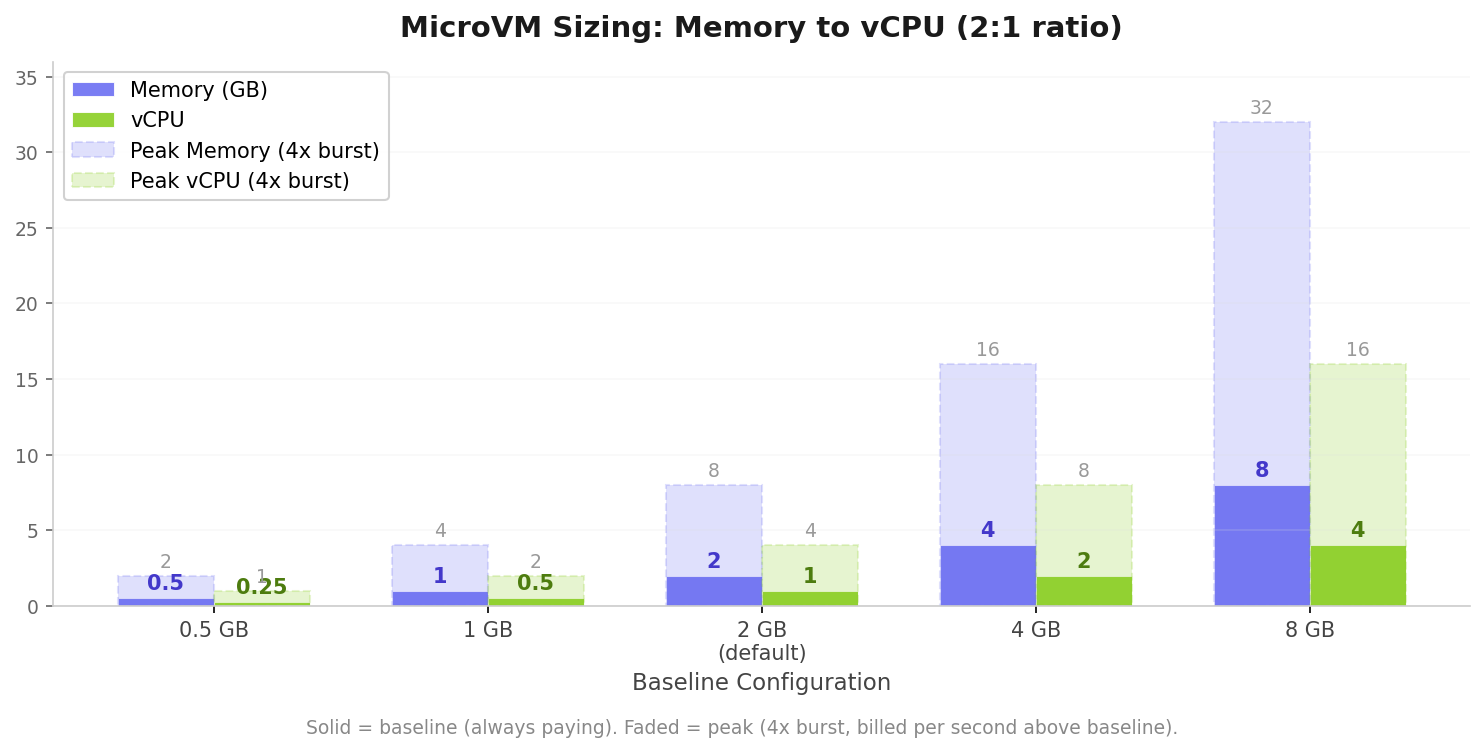
The rates for ARM (Graviton) in US East are $0.0000276944 per vCPU-second and $0.0000036667 per GB-second. For my setup (8 GB memory / 4 vCPU baseline), that works out to about $0.50 per hour at baseline. During burst periods when Claude Code is compiling, running tests, or installing packages, the VM can scale to 4x (32 GB / 16 vCPU), which runs about $2.02 per hour, and I only pay for the seconds I actually spend at peak.
For my actual usage pattern, roughly 2 hours a day, 20 days a month, with maybe 25% of that time at burst, the total compute comes to about $35 per month. Snapshot I/O and storage add about a dollar. So around $37 a month for a full cloud dev environment that sleeps when I walk away.
Let’s be honest, 8 GB is probably overkill. For this type of work 4 GB or even 2 GB might make more sense. At 2 GB / 1 vCPU baseline, the math changes significantly: baseline drops to $0.13 per hour, burst (8 GB / 4 vCPU) is $0.50 per hour, and the same usage pattern comes out to about $10 a month. That is the real serverless play: small baseline, burst when you need it, pay almost nothing when you do not.
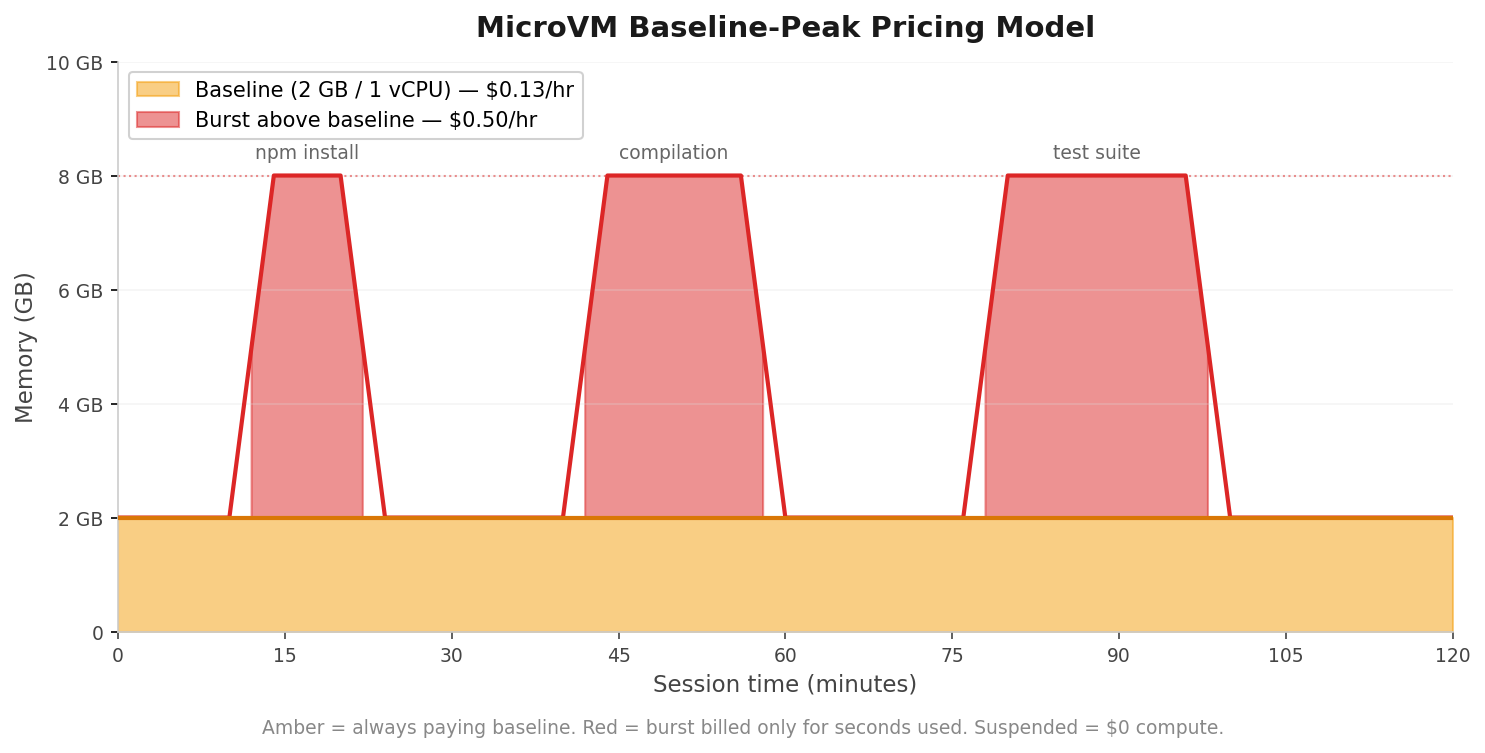
While suspended, I pay zero compute. The only cost is trivial snapshot storage for the suspended memory state, which amounts to pennies. That is the whole point of the idle policy: if I am not using it, it is not costing me anything meaningful.
The 8-hour hard cap is the other side of cost control. If I forget about a session entirely, it terminates after 8 hours regardless. The next sign-in spins up fresh, the home directory is still there, and I never get a surprise bill from a forgotten VM.
Wrapping up
I wanted a dev environment I could hit from any device. Powerful enough for Claude Code. Secure enough for experiments I would never run on my laptop. Asleep when I am not using it. And persistent across days and weeks. Lambda MicroVMs gave me the compute shape. S3 Files gave me the persistence. Together they are exactly what I needed.
The code is on GitHub. Deploy it, add yourself as a user, and you’ll have a Claude Code terminal from any browser. I would love to hear what you do with it. You can find all my socials at edjgeek.com.
#ServerlessForEveryone
Comments