My Brother Doesn't Code. Now He Ships Features.

My brother runs a large crew of pipelayers. The math they do in the field is genuinely hard. Rolling offsets, fitting angles, engineer tape measurements in decimal feet. I don’t understand any of it. But I know how to build apps, so I built him a calculator PWA.
The problem came after launch. Every time he needed something changed, he’d send me a message. “Can you make the font bigger?” “The offset calculator is wrong for 22.5 degree fittings.” I’d context-switch out of whatever I was doing, try to understand what he meant, get it wrong the first time, and eventually push a fix days later. I was the bottleneck, and I didn’t even understand the domain. He knows what the app needs. I know how to code. But the translation layer between us is lossy.
So I built an agent that cuts me out of the loop. He sends a message describing what he wants, the agent makes the changes, deploys a preview, and waits for his approval before pushing to production. No code. No git. No terminal. Just plain English and a preview link.
This isn’t a polished product. It’s a starting point. But the decisions behind it are intentional, and I think they’re worth walking through.
Why Telegram?
I needed a chat interface that was dead simple to use from a phone in the field. Telegram’s Bot API made this straightforward. You create a bot through @BotFather, get a token, register a webhook URL, and you’re receiving messages as JSON payloads. No app to build, no OAuth flow, no UI framework. The user just opens a chat and starts typing.
The bot becomes the entire interface. My brother doesn’t need to know what’s behind it.
The Architecture
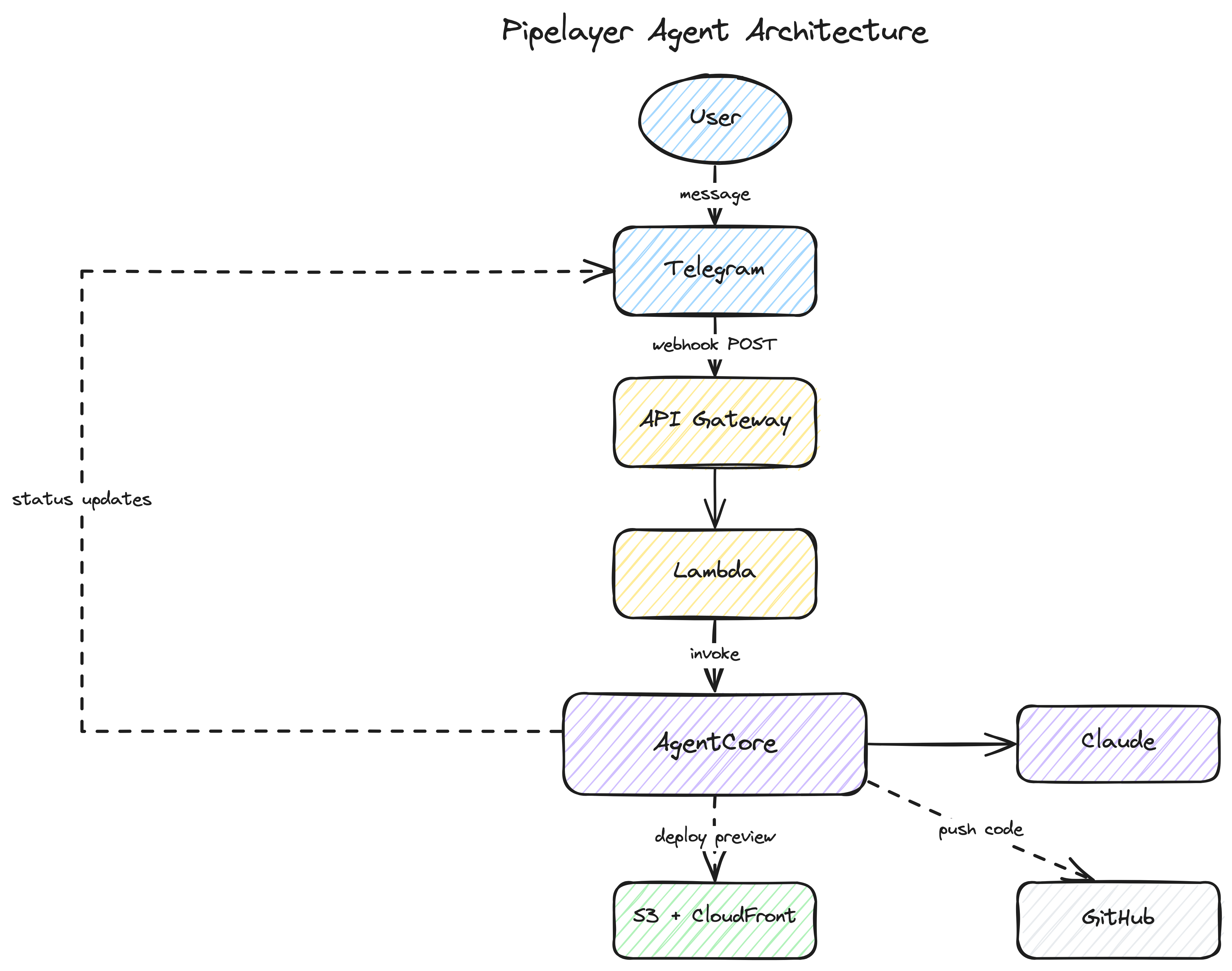
Here’s the full flow:
- User sends a message to the Telegram bot
- Telegram POSTs the message to an API Gateway endpoint
- A Lambda function receives it and invokes an AgentCore Runtime
- The AgentCore container runs Claude with access to the codebase
- Claude edits code, validates, builds, and deploys a preview to S3/CloudFront
- The agent sends status updates and the preview URL back through Telegram
- User reviews the preview and says “ship it” (or asks for changes)
- The agent merges to main and cleans up
Everything is defined in a single CDK stack. One cdk deploy creates all the infrastructure.
Claude as a Headless Developer
I chose Claude for the agent because of the Claude Agent SDK. It gives you a headless coding experience out of the box. Claude already knows how to read files, write code, run shell commands, and iterate on errors. I didn’t need to build any of that tooling. I just needed to point it at a codebase and give it constraints.
The query function from the SDK is the core of it:
from claude_agent_sdk import query, ClaudeAgentOptions

async for message in query(
    prompt=message_text,
    options=ClaudeAgentOptions(
        system_prompt=system_prompt,
        allowed_tools=["Read", "Write", "Edit", "Bash", "Glob", "Grep"],
        cwd=workspace,
        max_turns=30,
    ),
):
    if hasattr(message, "result"):
        result_text = str(message.result)
That’s the whole invocation. Claude gets the user’s message, a system prompt with context about the project, and a set of tools it can use. It figures out the rest.
The important part here is the system prompt. That’s where the guardrails live.
Guardrails Make It Safe
Handing an AI agent the keys to a production codebase sounds risky. It is, if you don’t constrain it. The system prompt is where you define what the agent can and can’t do:
GUARDRAILS:
1. ONLY modify files in src/ and tests/ directories.
2. ALWAYS run validation before deploying.
3. If validation fails, fix the issues and re-run until it passes.
4. NEVER deploy code that fails validation.
5. Keep changes focused — don't refactor unrelated code.
6. Preserve the engineer tape (decimal feet) convention.
7. Fitting angles are 11.25 / 22.5 / 45 / 90 degrees — don't change these.
Rules 6 and 7 are domain-specific. I don’t know pipelaying math, but I know those values are sacred. The agent needs to know that too.
The workflow section of the prompt is equally important. It tells Claude exactly how to validate, build, deploy a preview, and wait for approval before merging:
WORKFLOW:
1. Understand the user's request. If unclear, ask for clarification.
2. Make the changes.
3. Run validation: npm run validate
4. If validation fails, fix and retry (up to 3 attempts).
5. Build and deploy to preview.
6. Share the preview URL.
7. Wait for user approval before merging.
The agent never pushes to main on its own. It always deploys to a preview URL first and waits. That’s the safety net that makes this work for a non-developer. He can see the changes, try them out, and say “ship it” or “no, that’s not right.”
Who Gets Access
The agent has write access to a production codebase. You don’t want just anyone triggering it. Every incoming message goes through an authorization check before the agent does anything. The webhook Lambda passes the Telegram payload to AgentCore, and the first thing the entrypoint does is check the sender’s user ID against an allowlist:
if not is_authorized(message.user_id):
    return {"status": "ignored", "reason": "unauthorized"}
The allowlist is a comma-separated list of Telegram user IDs passed as a CloudFormation parameter at deploy time. My brother’s ID is on it. Mine is on it. Nobody else’s is. If someone random discovers the bot and sends it a message, it silently ignores them.
It’s simple, but it’s intentional. This is a family project, not a SaaS product. For anything broader, you’d want proper auth. But for controlling who can modify a specific app, a user ID allowlist is straightforward and hard to get wrong.
AgentCore: Ephemeral Compute with Long Runtimes
Here’s the thing about AI coding agents: they’re slow. Not in a bad way. They need time to read code, think, write changes, run validation, fix errors, build, and deploy. That can take minutes. And the user might send three or four follow-up messages in the same session, each one building on the last.
I’m a serverless guy. My default instinct is to reach for a Lambda function. But this workload doesn’t fit that model. It’s long-running, it’s conversational, and it needs state between messages. A container that stays warm across a session makes a lot more sense here.
Amazon Bedrock AgentCore gave me exactly that. It spins up a container when a request comes in, keeps it warm for subsequent messages from the same user, and shuts it down after an idle timeout. The container has everything the agent needs: Python, Node.js, git, AWS CLI. And because it persists across messages, the git workspace and npm dependencies survive between requests. The second message from the same user is fast because the repo is already cloned and node_modules is already installed.
Session affinity is the key. Each user gets a stable session ID derived from their Telegram user ID:
user_id = str(payload.get("message", {}).get("from", {}).get("id", "unknown"))
session_id = f"telegram-user-session-id-{user_id}"
AgentCore routes subsequent requests from the same session to the same container. The workspace persists. The conversation history persists. It feels stateful even though the compute is ephemeral.
The Async Trick
There’s a timing problem. Telegram expects a 200 response from your webhook within a few seconds. But the agent might take minutes to finish its work. You can’t block.
The solution is an async entrypoint pattern. The AgentCore @app.entrypoint handler returns immediately after spawning a background thread. The invoke_agent_runtime call from Lambda completes in under a second, Lambda returns 200 to Telegram, and the agent does its work in the background.
@app.entrypoint
def handle_request(payload, context=None):
    message = parse_telegram_message(payload)

    # Register an async task so the runtime stays alive
    task_id = app.add_async_task(
        f"agent-{message.user_id}",
        {"chat_id": message.chat_id, "user_id": message.user_id},
    )

    threading.Thread(
        target=_run_agent_background,
        args=(message.chat_id, message.user_id, message.text, task_id),
        daemon=True,
    ).start()

    return {"status": "accepted", "task_id": task_id}
The add_async_task call is crucial. It tells AgentCore “I’m not done yet, don’t shut down this container.” The background thread calls complete_async_task when it finishes, which lets the container go idle and eventually terminate.
While the agent works, it sends status updates directly to Telegram through the Bot API. The user sees “Thinking…”, “Setting up environment…”, “Syncing latest code…”, and eventually a preview URL. No polling. No websockets. Just the agent pushing messages as it goes.
One CDK Deploy
I wanted the entire infrastructure in a single stack. No clicking around in consoles, no multi-step deploy scripts. One cdk deploy and you’re done.
The CDK stack creates:
- An API Gateway endpoint for the Telegram webhook
- A Lambda function that relays messages to AgentCore
- The AgentCore Runtime (container built from source by CDK)
- An S3 bucket and CloudFront distribution for preview deployments
- A Secrets Manager secret for the GitHub deploy key
The AgentCore Runtime is the interesting part. CDK’s from_asset() builds the Docker image directly from the agent source directory, pushes it to ECR, and wires it into the Runtime resource. No separate build pipeline, no ECR commands, no image tagging:
agent_runtime = agentcore.Runtime(
    self, "PipelayerRuntime",
    runtime_name="pipelayer_agent",
    agent_runtime_artifact=agentcore.AgentRuntimeArtifact.from_asset(AGENT_DIR),
    environment_variables={
        "TELEGRAM_BOT_TOKEN": telegram_bot_token.value_as_string,
        "DEV_BUCKET": dev_bucket_name.value_as_string,
        "DEV_CDN_DOMAIN": dev_distribution.distribution_domain_name,
        "GITHUB_DEPLOY_KEY_SECRET": deploy_key_secret.secret_arn,
        # ...
    },
)
Each user gets their own git branch (dev/user-{id}) and their own S3 prefix for preview deployments. The preview URL is served through CloudFront with caching disabled so changes show up immediately on refresh.
What It Looks Like
Here’s a real interaction:
User: “Make the font bigger on the offset calculator”
Agent: 🤔 Thinking… Agent: 🔐 Setting up environment… Agent: 📦 Syncing latest code… Agent: ✅ Preview live at https://d1234.cloudfront.net/user-567/
The agent reads the codebase, finds the relevant component, increases the font size, runs npm run validate, builds the app, and deploys it to the preview URL. A couple minutes, start to finish.
Agent: “Changes deployed to your preview. I increased the font size on the offset calculator screen from 16px to 20px for the input fields and from 14px to 18px for the labels. Refresh to see the updates.”
The user opens the preview link, checks it on their phone, and either asks for adjustments or says “ship it.”
User: “ship it”
Agent: “Pushed to production. Changes are deploying, may take a few minutes. Refresh your browser to see the update.”
The agent merges the branch to main, pushes to GitHub, and cleans up the preview deployment. Done.
What I’d Do Differently
This is a starting point, not a finished product. A few things I’d improve:
The conversation history is in-memory. It works because AgentCore keeps the container alive across messages in the same session, but if the container recycles, the history is gone. For a more durable solution, you’d want to persist conversation state to DynamoDB or S3.
There’s no rollback mechanism. If a change breaks something in production, you’d need to revert manually. Adding a “roll back the last change” command would be a natural next step.
The Real Takeaway
AI agents work best when you constrain them. The guardrails in the system prompt are what make this safe enough to hand to someone who doesn’t code. The agent can’t touch files outside src/ and tests/. It can’t deploy without passing validation. It can’t push to production without explicit approval. Those constraints are what turn a powerful but unpredictable tool into something a pipelayer can use from a job site.
My brother doesn’t need to understand React, or git, or AWS. He just needs to describe what he wants. The agent handles the rest, within boundaries I set.
If you want to dig into the full implementation, the repo is at github.com/singledigit/pipelayer-agent. It’s not perfect, but it works. And my brother ships features now.
For the Agents
If you’re using an AI coding assistant, here are some resources that cover the technologies in this post:
Kiro Powers (install from the Kiro Powers panel):
- aws-agentcore — AgentCore runtime management, memory, gateway configuration, and deployment workflows
Agent Instructions
Grab the companion agent file for this post. Use it as Kiro steering, CLAUDE.md, or any agent instructions format.
Comments