Lambda Just Got a File System. I Put AI Agents on It.
You’ve written this code before. An S3 event fires, your Lambda function wakes up, and the first thing it does is download a file to /tmp. Process it. Upload the result. Clean up /tmp so you don’t run out of space. Repeat for every file, every invocation, every function in your pipeline.
S3 Files changes that. You mount your S3 bucket as a local file system, and your Lambda code just uses open(). I built a set of AI code review agents that share a workspace through a mounted S3 bucket, orchestrated by a durable function, and the file access code is the most boring part of the whole project. That’s the point.
The /tmp Tax
If you’ve built anything on Lambda that touches S3 data, you know the pattern. You need a file. S3 doesn’t give you files. It gives you objects. So you download the object to /tmp, do your work, and upload the result back.
# The old way: every Lambda developer has written this
import boto3

s3 = boto3.client("s3")

def lambda_handler(event, context):
    bucket = event["bucket"]
    key = event["key"]

    # Download to /tmp
    local_path = f"/tmp/{key.split('/')[-1]}"
    s3.download_file(bucket, key, local_path)

    # Do your actual work
    with open(local_path) as f:
        content = f.read()
    result = process(content)

    # Upload the result
    s3.put_object(Bucket=bucket, Key=f"output/{key}", Body=result)

    # Clean up so you don't fill /tmp
    os.remove(local_path)
That’s a lot of ceremony for “read a file and write a file.” And it gets worse when you have multiple functions that need to work with the same data. Each one downloads its own copy. Each one manages its own /tmp. If you’re processing a large repo or a dataset, you’re burning through the 10GB /tmp limit fast.
I’d be doing you a disservice if I didn’t mention the libraries that make this less painful. Tools like s3fs and smart_open abstract some of this away. But they’re still making API calls under the hood. Your code is still talking to S3 through an SDK, not through a file system.
S3 Files for Lambda
S3 Files is a new feature that mounts your S3 bucket as a local file system on your Lambda function. Your code reads and writes files at a mount path like /mnt/workspace, and S3 Files handles the synchronization back to the bucket. Changes you write show up in S3 within minutes. Changes made to S3 objects appear on the file system within seconds.
# The new way: just file paths
from pathlib import Path

WORKSPACE = Path("/mnt/workspace")

def lambda_handler(event, context):
    # Read directly from the mount
    content = (WORKSPACE / "source" / "app.py").read_text()
    result = process(content)

    # Write directly to the mount
    (WORKSPACE / "output" / "result.json").write_text(result)
No boto3 for file access. No /tmp management. No upload step. The file system IS the interface.
Under the hood, S3 Files is built on Amazon EFS. It delivers sub-millisecond latency for actively used data by caching your working set on high-performance storage. For large sequential reads, it streams directly from S3. You get file system semantics with S3 durability and economics.
Here’s the thing, though. S3 Files requires a VPC. Your Lambda function needs to be in the same VPC as the mount targets, and you need a NAT gateway for outbound internet access.
I’ll be honest: as a serverless guy, I generally avoid VPCs. But AWS has removed most of the hurdles over the years. VPC-attached Lambda functions no longer have the cold start penalty they used to. The networking setup is boilerplate you write once. And for what S3 Files gives you, the tradeoff is worth it. Get yourself a reusable network template and move on.
What We’re Building
I wanted to test S3 Files with something more interesting than “read a CSV.” So I built a serverless code review system. You point it at a public GitHub repo, and three things happen:
- A durable orchestrator function clones the repo to a shared S3 Files workspace
- A security review agent and a style review agent analyze the code in parallel
- The results land in the same workspace as JSON files, synced back to S3
All three Lambda functions mount the same S3 bucket. The orchestrator writes files. The agents read them. No S3 keys passed between functions. No downloading to /tmp. The file system is the coordination layer.
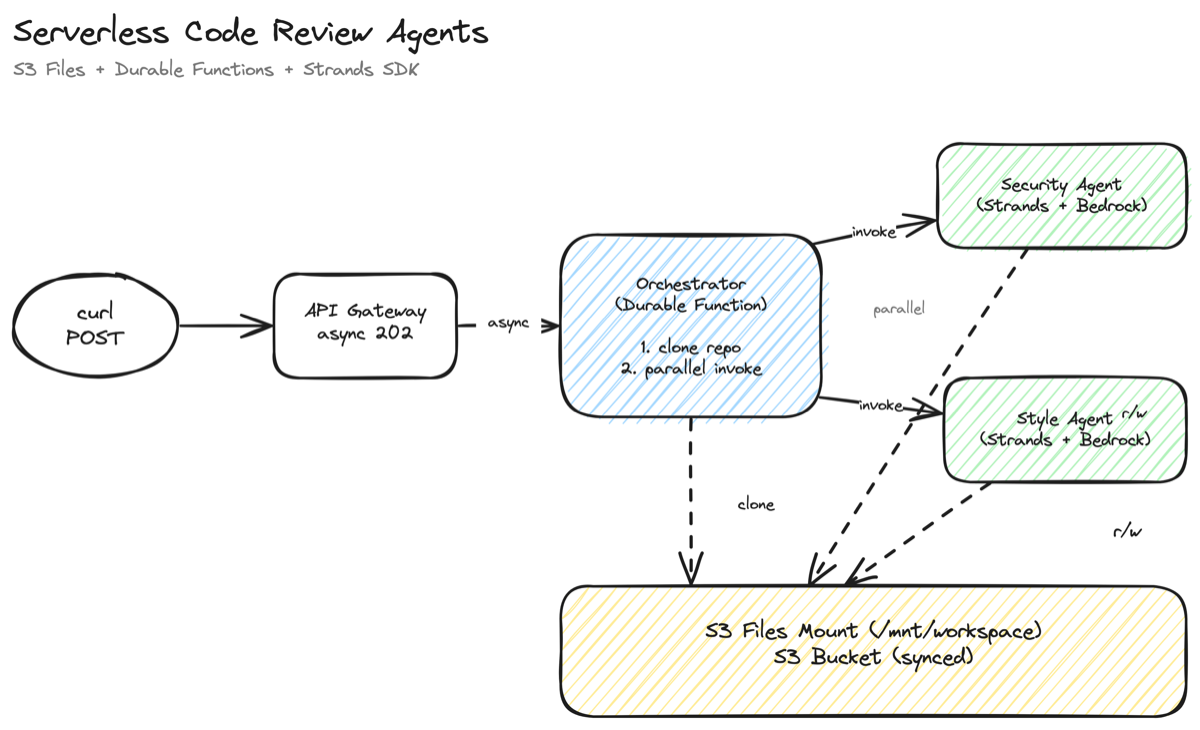
The agents use the Strands Agents SDK with Amazon Bedrock. Each agent gets custom file tools that operate on the mount path, and Claude decides which files to read, what to analyze, and what to write. The orchestrator uses Lambda durable functions to coordinate the workflow with automatic checkpointing.
The full source is on GitHub: singledigit/lambda-s3-files-example
The SAM Template
The IaC is the part that took the most iteration. S3 Files is brand new, and the CloudFormation resource types aren’t in the linter yet. Here’s what I learned.
The Resource Chain
You need five resources to get S3 Files working with Lambda:
- S3 Bucket with versioning enabled (required)
- IAM Role for S3 Files to access the bucket
- S3 Files FileSystem that bridges the bucket to NFS
- Mount Targets in each AZ (network endpoints)
- Access Point that controls POSIX identity for Lambda
The resource types are AWS::S3Files::FileSystem, AWS::S3Files::MountTarget, and AWS::S3Files::AccessPoint. Your IDE’s CloudFormation linter won’t recognize them yet. Ignore the red squiggles.
The IAM Role Gotcha
The S3 Files IAM role trusts elasticfilesystem.amazonaws.com, not s3files.amazonaws.com. This tripped me up. S3 Files is built on EFS, so the trust relationship goes through the EFS service principal.
S3FilesRole:
  Type: AWS::IAM::Role
  Properties:
    Path: /service-role/
    AssumeRolePolicyDocument:
      Version: '2012-10-17'
      Statement:
        - Sid: AllowS3FilesAssumeRole
          Effect: Allow
          Principal:
            Service: elasticfilesystem.amazonaws.com
          Action: sts:AssumeRole
          Condition:
            StringEquals:
              aws:SourceAccount: !Ref AWS::AccountId
            ArnLike:
              aws:SourceArn: !Sub 'arn:aws:s3files:${AWS::Region}:${AWS::AccountId}:file-system/*'
The role needs S3 permissions to read and write the bucket. Scope it to your specific bucket ARN with aws:ResourceAccount conditions.
The Access Point
This is the important part for Lambda. The access point controls the POSIX identity your function runs as and creates a writable root directory. Without it, Lambda can mount the file system but can’t write to it.
S3FilesAccessPoint:
  Type: AWS::S3Files::AccessPoint
  Properties:
    FileSystemId: !GetAtt S3FileSystem.FileSystemId
    PosixUser:
      Uid: '1000'
      Gid: '1000'
    RootDirectory:
      Path: /lambda
      CreationPermissions:
        OwnerUid: '1000'
        OwnerGid: '1000'
        Permissions: '755'
The CreationPermissions property is crucial. It auto-creates the /lambda directory with the right ownership when a client first connects. Without it, the root directory is owned by root (UID 0), and Lambda (running as UID 1000 through the access point) can’t create subdirectories.
The rule of thumb I like (if you have them) is this: if you’re using EFS access points, you use CreationInfo. If you’re using S3 Files access points, you use CreationPermissions. Same concept, different property name.
Lambda Configuration
On the Lambda side, FileSystemConfigs takes the access point ARN (not the file system ARN) and a local mount path:
OrchestratorFunction:
  Type: AWS::Serverless::Function
  DependsOn:
    - MountTargetA
    - MountTargetB
  Properties:
    FileSystemConfigs:
      - Arn: !GetAtt S3FilesAccessPoint.AccessPointArn
        LocalMountPath: /mnt/workspace
    VpcConfig:
      SecurityGroupIds:
        - !GetAtt NetworkingStack.Outputs.LambdaSGId
      SubnetIds:
        - !GetAtt NetworkingStack.Outputs.PrivateSubnetAId
        - !GetAtt NetworkingStack.Outputs.PrivateSubnetBId
The DependsOn on the mount targets is important. Lambda can’t mount the file system until the mount targets are available, and they take about five minutes to create.
For IAM, Lambda needs s3files:ClientMount and s3files:ClientWrite permissions on the file system ARN. Not elasticfilesystem:ClientMount. The IAM actions use the s3files namespace even though the trust policy uses the EFS principal. I know. It’s a new service.
Async API Gateway for Durable Functions
You don’t want a synchronous API call here. The orchestrator kicks off agents that could run for minutes, and you don’t want it spinning while they work. That’s wasted money. And you don’t want your caller staring at a spinning ball either. Kick it off and move on. Asynchronous is the way.
The trick is an OpenAPI definition that sets the X-Amz-Invocation-Type header to Event:
x-amazon-apigateway-integration:
  type: aws
  httpMethod: POST
  uri: !Sub 'arn:aws:apigateway:${AWS::Region}:lambda:path/2015-03-31/functions/${OrchestratorFunction.Alias}/invocations'
  credentials: !GetAtt ApiGatewayRole.Arn
  requestParameters:
    integration.request.header.X-Amz-Invocation-Type: "'Event'"
The API returns 202 immediately. The durable function runs in the background. You check the S3 bucket for results.
The Orchestrator
The orchestrator is a durable function that coordinates the pipeline. It runs three steps: clone the repo, invoke both review agents in parallel, and write a combined summary.
The clone step downloads a GitHub tarball and extracts it to the mounted workspace using standard Python. No boto3. Just tarfile, pathlib, and requests.
@durable_step
def clone_repo(step_ctx: StepContext, repo_url: str, review_id: str):
    """Download a public GitHub repo tarball and extract to the workspace."""
    tarball_url = repo_url.rstrip("/") + "/archive/refs/heads/main.tar.gz"
    response = requests.get(tarball_url, timeout=120, stream=True)

    if response.status_code == 404:
        tarball_url = repo_url.rstrip("/") + "/archive/refs/heads/master.tar.gz"
        response = requests.get(tarball_url, timeout=120, stream=True)

    response.raise_for_status()

    source_dir = Path(WORKSPACE) / review_id / "source"
    source_dir.mkdir(parents=True, exist_ok=True)

    tarball_bytes = io.BytesIO(response.content)
    with tarfile.open(fileobj=tarball_bytes, mode="r:gz") as tar:
        for member in tar.getmembers():
            if not member.isfile():
                continue
            # Extract code files to the mounted workspace
            dest = source_dir / relative_path
            dest.parent.mkdir(parents=True, exist_ok=True)
            dest.write_bytes(tar.extractfile(member).read())
That source_dir.mkdir() call is writing to /mnt/workspace/{repo}/source/. That’s the S3 Files mount. The files land on the file system and sync back to the S3 bucket automatically.
The parallel step uses context.invoke() to call both agent functions at the same time:
@durable_execution
def handler(event: dict, context: DurableContext) -> dict:
    # Step 1: Clone the repo
    clone_result = context.step(clone_repo(repo_url, review_id))

    # Step 2: Run reviews in parallel
    def security_review(ctx: DurableContext):
        return ctx.invoke(SECURITY_AGENT_ARN, {"review_id": review_id}, name="security-review")

    def style_review(ctx: DurableContext):
        return ctx.invoke(STYLE_AGENT_ARN, {"review_id": review_id}, name="style-review")

    results = context.parallel(
        [security_review, style_review],
        name="parallel-reviews",
        config=ParallelConfig(max_concurrency=2),
    )
If the orchestrator gets interrupted after the clone but before the reviews, the durable function picks up from the checkpoint. It doesn’t re-clone. That’s the whole idea behind durable functions.
The Agents
Each review agent is a Strands agent with three custom tools that operate on the S3 Files mount: list_files, read_file, and write_review. The agent decides which files to read, what to analyze, and when to write its findings.
@tool
def list_files(path: str = ".") -> str:
    """List files and directories at a path in the source code workspace."""
    source_dir = Path(WORKSPACE) / review_id / "source"
    target = source_dir / path
    entries = []
    for item in sorted(target.iterdir()):
        if item.is_dir():
            entries.append(f"  [dir]  {item.name}/")
        else:
            entries.append(f"  [file] {item.name} ({item.stat().st_size} bytes)")
    return "\n".join(entries)

@tool
def read_file(path: str) -> str:
    """Read the contents of a source code file from the workspace."""
    source_dir = Path(WORKSPACE) / review_id / "source"
    return (source_dir / path).read_text(encoding="utf-8", errors="ignore")

@tool
def write_review(filename: str, content: str) -> str:
    """Write review findings to a JSON file in the reviews directory."""
    reviews_dir = Path(WORKSPACE) / review_id / "reviews"
    reviews_dir.mkdir(parents=True, exist_ok=True)
    (reviews_dir / filename).write_text(content)
    return f"Written to {reviews_dir / filename}"
Every tool is just pathlib and open(). The agent reads from /mnt/workspace/{repo}/source/ and writes to /mnt/workspace/{repo}/reviews/. Those paths are on the S3 Files mount. The agent doesn’t know or care that it’s talking to S3.
The handler creates a Strands agent with a system prompt and lets it run:
model = BedrockModel(model_id=MODEL_ID, max_tokens=4096)

agent = Agent(
    model=model,
    tools=[list_files, read_file, write_review],
    system_prompt=SECURITY_SYSTEM_PROMPT,
)

response = agent(
    f"Review the source code for security issues. "
    f"Start by listing the root directory, then read the key files "
    f"and write your findings to 'security.json'."
)
Claude explores the codebase on its own. It lists directories, reads files it finds interesting, and writes a structured JSON review. The security agent looks for hardcoded secrets, injection vulnerabilities, and overly permissive IAM policies. The style agent checks naming conventions, documentation gaps, and code organization.
Both agents run in parallel on the same mounted workspace. One writes security.json, the other writes style.json. No coordination needed beyond the file system.
Deploy and Try It
The full source code is on GitHub with deploy instructions in the README. Clone it, run sam build --use-container && sam deploy --guided, and you’ll have the whole stack up in about 15 minutes. Point it at any public GitHub repo and check the S3 bucket for results.
When S3 Files Makes Sense for Lambda
S3 Files works well when your Lambda functions need shared access to data that lives in S3. Multiple functions reading and writing the same files. Agents that need to explore a directory tree. Libraries that expect file paths instead of byte streams. Workloads where the data is already in S3 and you don’t want to copy it somewhere else.
It’s less ideal when you’re processing a single small file from an S3 event notification. If your function downloads one object, processes it, and uploads the result, the classic boto3 pattern is simpler. You don’t need a VPC, mount targets, or an access point for that.
The cost picture is straightforward. You pay for the S3 Files high-performance storage (your active working set), S3 requests during sync, and the standard VPC costs (NAT gateway is the big one). For workloads that would otherwise duplicate data between S3 and EFS, S3 Files can be up to 90% cheaper because you’re not maintaining a separate file system.
The production consideration worth calling out: S3 Files syncs writes back to S3 within minutes, not milliseconds. If you need another system to read the results immediately after your Lambda writes them, you’ll want to account for that delay. For our code review use case, this is fine. The orchestrator writes the summary after both agents finish, and the user checks the bucket when they’re ready.
Stop Writing Boilerplate
For years, the answer to “can I mount S3 in Lambda?” was just “no.” Now you can. And the code to do it is the least interesting part of your function.
Your agents can read files like they’re local. Your pipelines can share a workspace without passing S3 keys around. Your libraries that expect file paths just work.
The full source code is on GitHub. Clone it, deploy it, point it at your own repos. The SAM template handles everything: VPC, S3 Files, mount targets, access points, durable orchestrator, and Strands agents.
Stop downloading from S3 to /tmp. Mount your bucket.
Comments